Free & Paid Ways to Migrate Apple Mail to Office 365


Are you planning to move Mac Mail/Apple Mail to Microsoft Office 365 account, but don’t know how to migrate Apple Mail to Office 365? Many Mac users store years of important emails in their Apple Mail. Ultimately, users want to transfer Mac Mail to Microsoft Office 365 for superior collaboration & enhanced cloud access. Nevertheless, transferring Apple Mail into Office 365 isn’t a copy-paste task. If you have extensive Apple Mail mailboxes & are looking to move them to Microsoft Office 365, then you have arrived at the right destination!
In this blog, users find reliable ways to migrate Apple Mail to Office 365 without losing mailbox data. This article also explains simple methods to how to directly switch from Apple Mail to Office 365. This blog will highlight both affordable & expert methods to effortlessly complete the process.
Top Reasons to Migrate Mac Mail | Apple Mail to Office 365
Apple Mail is a reliable email application to macOS users. Most individuals & organizations switch to Microsoft Office 365 to take advantage of cloud-based email management & collaboration features. Let’s know most common reasons behind
- Users can directly access Apple Mail emails from anywhere by using Outlook web.
- MS Office 365 provides centralized mailbox management.
- It helps to collaborate with other Microsoft apps such as Teams, Outlook, & Exchange Online.
- Microsoft Office also provides enterprise-grade security & compliance features.
- Users can increase mailbox storage as per their requirements, unlike local Apple Mail.
- Office 365 also easily manages business email accounts in a single platform.
Migrating from Apple Mail to Office 365 allows users maintain mailbox synchronization across Windows, Mac, smartphones, & web browsers. They don’t need to rely on the local Apple Mail profile.
Pro Tips Before Beginning Apple Mail to Microsoft 365
Check number of mailboxes, size & total number of data you are going to migrate in Office 365. It helps users to know migration time & right method to migrate Mac Mail emails.
Select the method according to your mailbox size, budget & project complexity.
- Before beginning, create a backup copy of Apple Mail data. A backup copy helps you to save emails in case anything unexpected happens.
- Before beginning migration, review user accounts are created, licenses are assigned, & destination mailboxes are ready to receive data.
- A stable internet connection prevents interruptions, failed uploads, & unnecessary delays during migration.
- Do not delete your Apple Mail data immediately. Hold on to your original mailbox until all emails and other content have been accurately moved to Office 365.
Free Method to Migrate Apple Mail to Office 365 Account
If you are using an Apple Mail account with IMAP-based email such as Gmail, Yahoo Mail, Outlook.com or another email service, then you can easily sync your Mac Mail mailbox with Office 365. Thinking how, follow some steps–
- Firstly, open Apple Mail.
- Check that all emails are fully synchronized with the email server.
- Wait until every folder is updated.
- Open Outlook for Mac or Outlook for Windows.
- Sign in to your Microsoft 365 account.
- Complete authentication procedure.
- Identify required folders in Apple Mail.
- Drag and drop emails into folders of your Office 365 mailbox.
- Wait for Outlook to finish uploading all messages to Microsoft 365 server.
Limitations of Free Techniques
The free method didn’t charge any cost to upload Mac Mail emails into Office 365, but they come with some drawbacks.
- They need both accounts to remain connected throughout the process.
- Folder hierarchy can be changed.
- Duplicate emails may occur in MS Office 365 accounts.
- Not suitable for moving archived Apple Mail (MBOX) files.
- Require good internet connection during Mac Mail to Office 365 migration.
- Sometimes, Apple Mail mailbox attachments fail during the upload procedure.
- The free method may fail to upload thousands of Apple Mail emails into Office 365.
Proficient Method to Migrate Apple Mail to Office 365
If you want to migrate Apple Mail mailbox without worrying about data, then try Office 365 Import Tool. This application is an easy & safe solution to import bulk of Mac Mail emails into Microsoft Office 365 accounts. Users didn’t face missing emails & complicated manual steps.
This dedicated solution didn’t require technical knowledge to import Apple Mail mailbox files into Microsoft 365. Everyone can operate this utility. It also maintains mailbox integrity during migration. Download the free version today to explore more about software.
Steps to Move Apple Mail to Office 365 Account
- Download Apple Mail to Office 365 Migration Software.
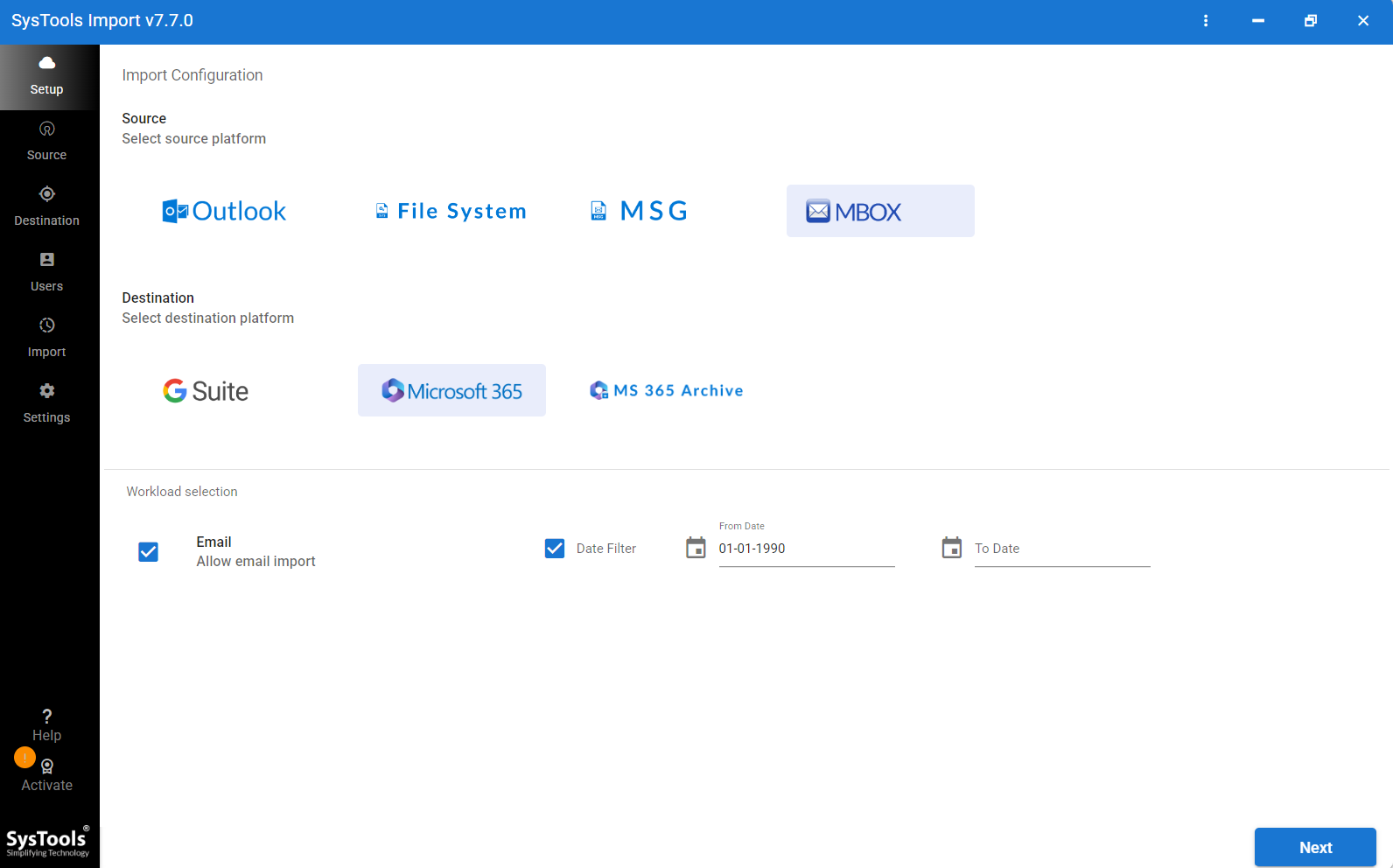
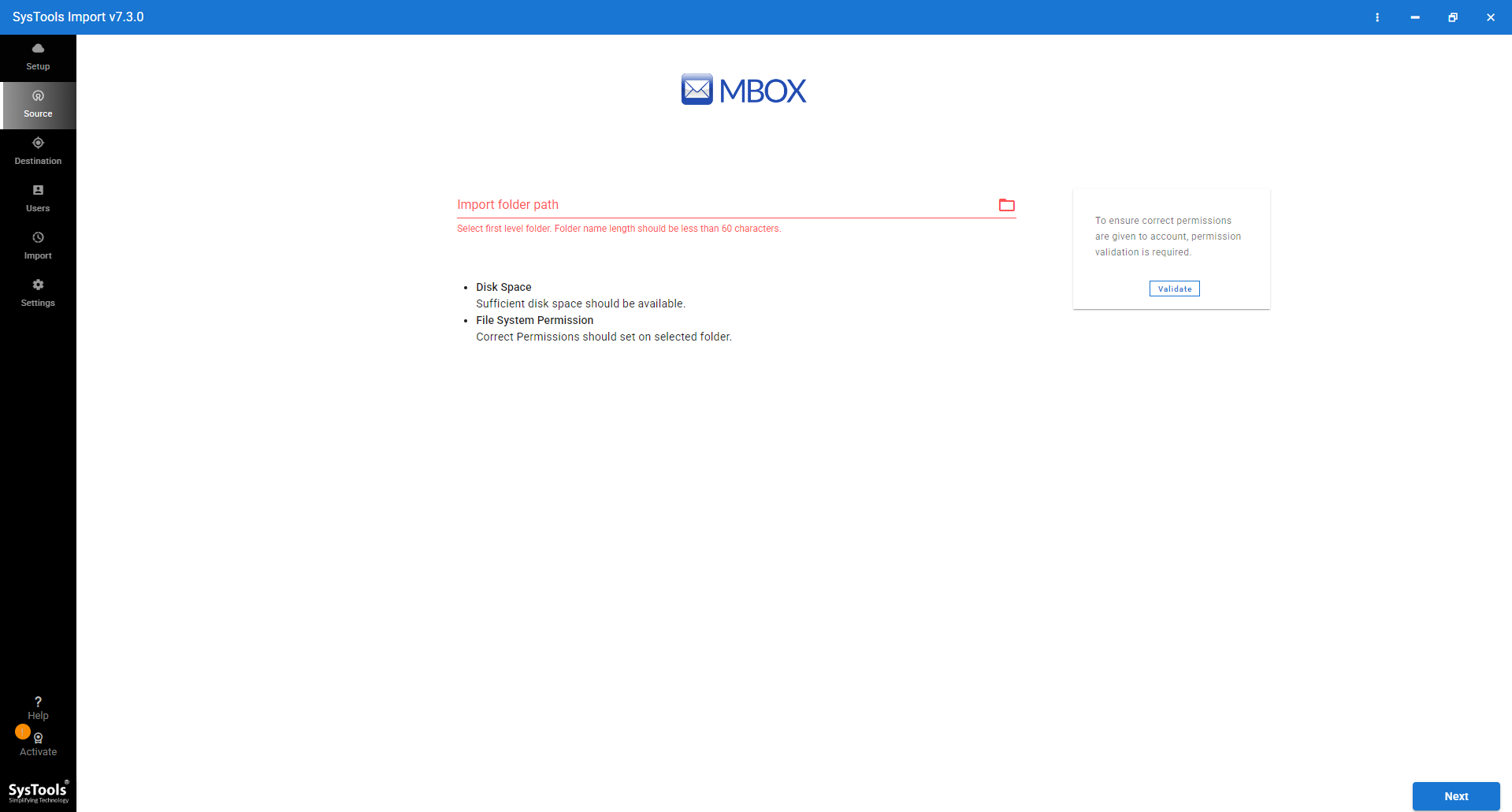
- Once done, you need to Browse MBOX file as you want to convert.
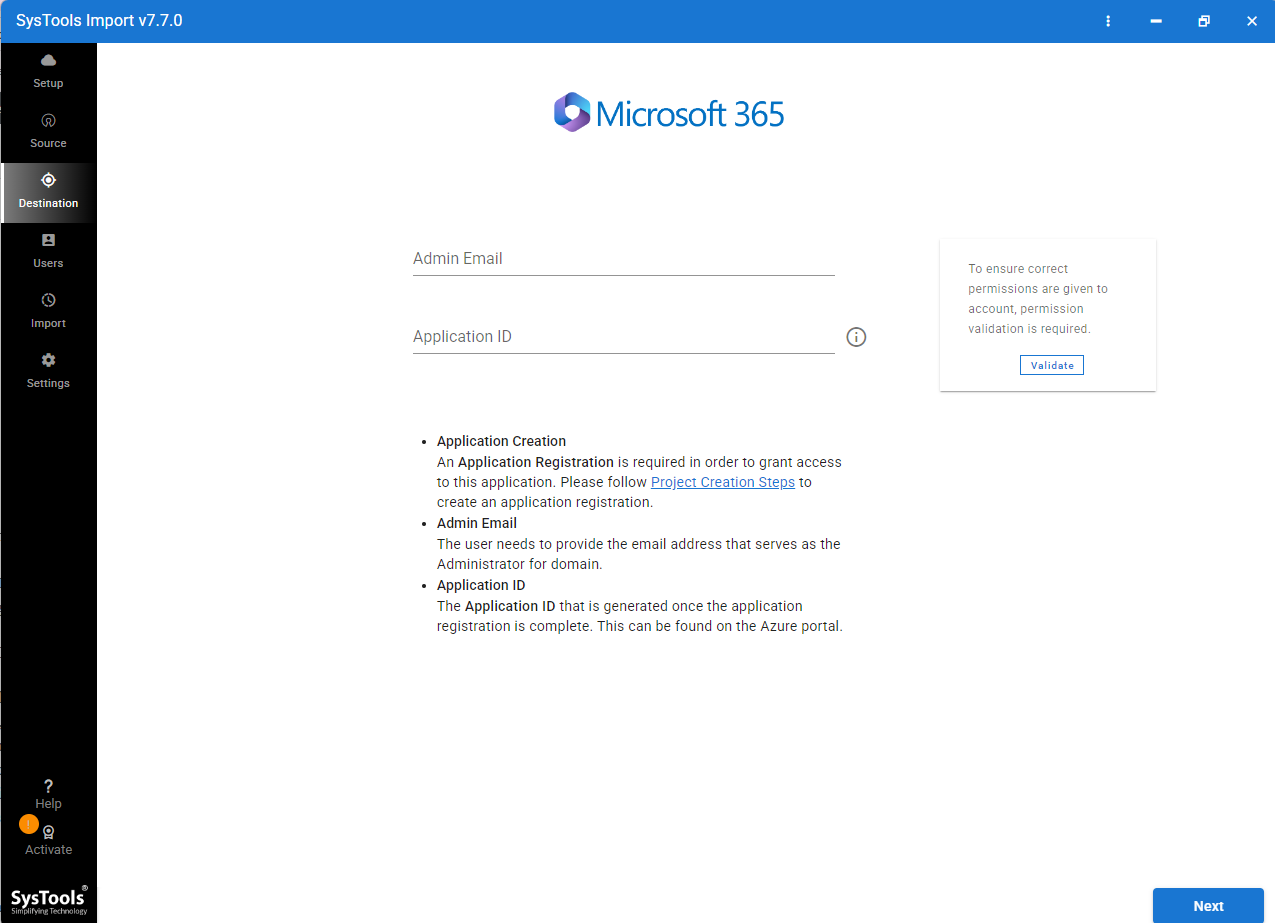
- Login with Microsoft Office 365 account.
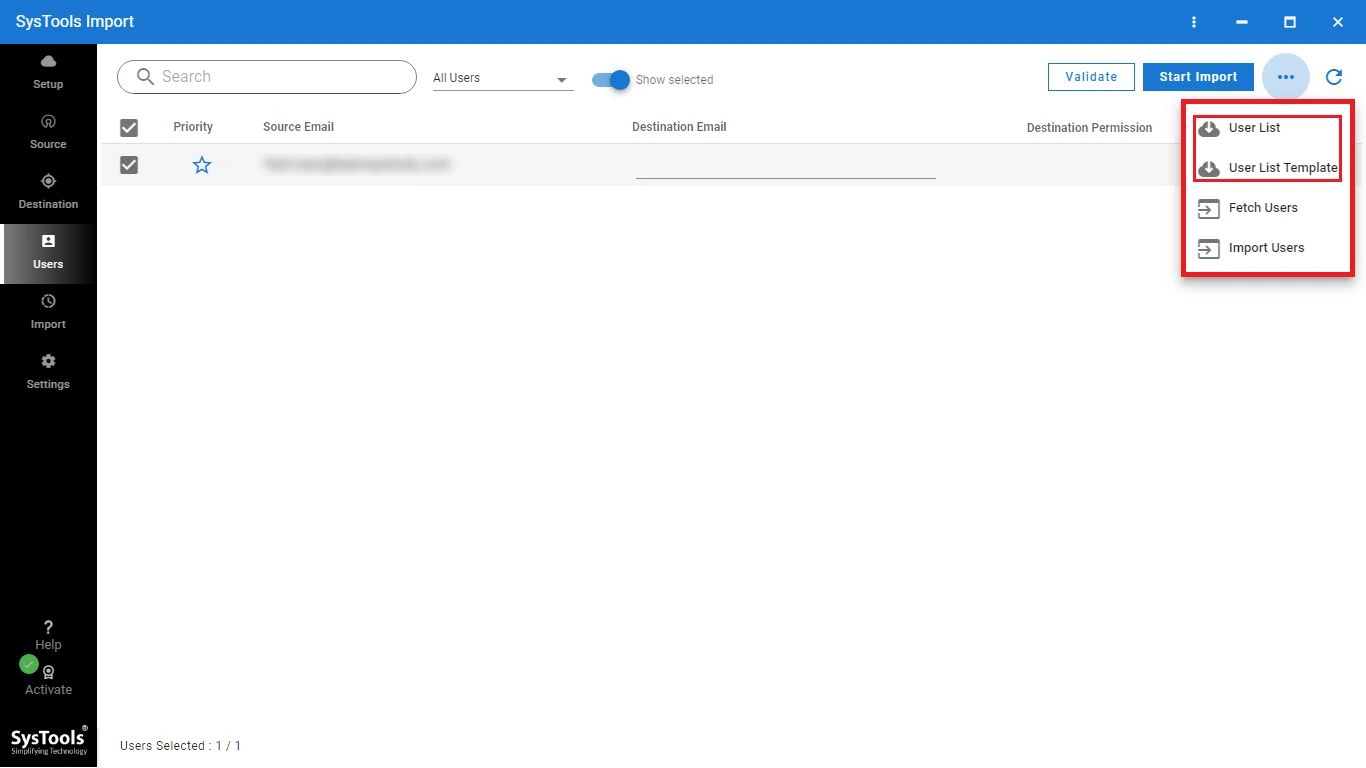
- Once connected, start the Apple Mail to Office 365 migration process.
Significant Features in Expert Solution
- Direct migration: Users import from Apple Mail to Office 365 without needing any email client. Simply download software & log in using your MS Office account to transfer Mac Mail emails to Office 365.
- Attachment Retention: This tool easily transfers emails along with attachments without any data loss. Users can now move Apple Mail emails with attachments into Microsoft Office 365.
- Preserves folder hierarchy: It didn’t alter folder structure during & after migration. Users get the same folder in Office 365 as they saved in Microsoft Office 365.
- Bulk Conversion: This tool also supports large mailbox migration. Users didn’t need to worry about data size during Apple Mail to Office 365 migration.
- No Data Loss: Another feature of this application, it reduces risk of data loss during the import process. This application also maintains email formatting & metadata of Apple Mailbox.
- Quick GUI: Users get a simple interface that doesn’t require technical knowledge to import Mac Mail to Microsoft Office 365. This utility saves time during the migration process. Both technical and non-technical users can easily use this application.
Concluding Remarks
In this blog, users get to know trusted & free methods to migrate Apple Mail to Office 365. This article shows free & paid methods that help users move bulk of Mac Mail mailboxes into Office 365. The Manual method is good to transfer a small number of synchronized emails from Apple Mail to MS O365 account. Nevertheless, if you have large archived Apple Mail mailboxes & safely want to access them in MS Office, then choose a professional method. It provides fast & safe migration from Apple Mail to Microsoft Office 365. Choose any method that fulfils your needs as per your requirements.