Migrate Zimbra to Office 365 Securely with Expert Guide


Nowadays, many organizations need to move their emails from one system to another to improve performance, security & cost management. This process is known as email migration. One common example is Migrate Zimbra to Office 365. In this business shift from Zimbra, which is an older email platform, to Microsoft Office 365, which is a modern cloud-based service.
Companies choose to migrate email from Zimbra to Office 365 because Office 365 offers better security. It is easy to access from anywhere, automatic updates & more collaboration tools such as Teams & OneDrive. It also helps businesses work more seamlessly without technical issues.
This guide explains the complete process in simple terms, including different migration techniques, step-by-step instructions & common challenges users may face during migration. In the end, readers will understand how email migration works % what to consider before moving their data safely & efficiently.
Understand Zimbra and Office 365
What is Zimbra?
Zimbra is a business level platform. It is used for email, calendar & teamwork. It is widely used because it is secure, reliable & focuses on user privacy. So many organizations use it as an alternative to big services like Microsoft Exchange or Google Workspace, while it still gets similar emails & collaboration features.
What is Office 365?
Office 365 is now called Microsoft 365. It is a cloud-based service you use by paying a subscription. It gives you access to Microsoft’s popular productivity tools. This includes advanced versions of apps like Word, Excel & PowerPoint with cloud storage & smart AI-based features to help improve work & productivity.
Why Migrate Zimbra to Office 365?
Moving to Zimbra to Microsoft Office 365 gives organizations better tools for working together, stronger security & the ability to grow easily. It also connects smoothly with other Microsoft tools that helps teams to manage their daily work in one place. Companies usually switch to Office 365 so their employees can work better especially when working from different locations.
Here are the main reasons to migrate email from Zimbra to Office 365:
- It works properly with apps like Microsoft Teams, SharePoint & OneDrive making it easy for people to chat, share files & work together in real time.
- Since it is cloud-based, users can access emails & files from any device, anywhere, using the internet.
- It does not depend on physical servers that is why companies can easily increase storage & add more users when needed.
- The System updates itself, that is why users always get the latest features without doing anything manually.
Method to Migrate Zimbra to Office 365
Here are some methods to follow to migrate email from Zimbra to Office 365:
Method 1: Free Method by Using IMAP
- Sign in to your Zimbra Admin account.
- Open Configure section.
- Check, IMAP is enabled for all user mailboxes.
- Save the changes.
- Sign in to Microsoft 365 Admin Center.
- Verify domain.
- Create & license mailboxes for all users who will receive migrated emails.
- Now, sign in to the Exchange Admin Center.
- Go to Recipients > Migration > More > Migration endpoints & create new IMAP migration endpoints with your Zimbra server name & port details.
- Open Microsoft Excel & create CSV file containing emails address, username & password for each mailbox.
- Save file in CSV format.
- Go to Migration & click Add Migration Batch.
- Select IMAP migration as migration type.
- Upload the CSV file you created.
- Select the migration endpoint you created in Step 9.
- Now, review all information & click Start Migration.
Note: It is a free method to migrate Zimbra to Office 365. However, in the manual method, only emails are migrated, contacts, calendars, tasks & notes are not transferred using this method. Free method doesn’t support bulk migration, it becomes difficult & time-consuming to manage for large organizations with many users. Migration can take hours & even days, depending on mailbox size. There is a possibility of emails missing, duplicate emails or incomplete transfers.
Method 2: Expert Method to Migrate Email from Zimbra to Office 365
As you saw above, the free method will work but it has some limitations so if you want reliable results, then you can choose an expert method, which is Office 365 Import Tool. This software securely uploads PST files directly to Microsoft 365 using Microsoft’s latest technology. It provides safe login, protects data & ensures smooth & future-ready migration.
A Quick Tip: Before beginning, you need to follow these steps to get an EML file from TGZ. These steps help you to import bulk of EML files into Office 365. Follow the steps below:
- Firstly, Install WinRAR or 7-Zip.
- Next, use mouse right click & extract Zimbra TGZ file.
- Once Extracted TGZ file, install Mozilla Thunderbird.
- Open Thunderbird & import extracted (MBOX) mailbox data.
- Add an extension whose name is “ImportExportTools NG.”
- Restart Thunderbird & right-click to the imported mailbox.
- Now choose ImportExportTools NG > Export All Messages > EML Format.
- Pick any location to save the exported EML file.
You get EML files from TGZ, now use software to upload EML files into Microsoft Office 365 accounts. Here Begin:
- Install Zimbra to Office 365 converter tool.
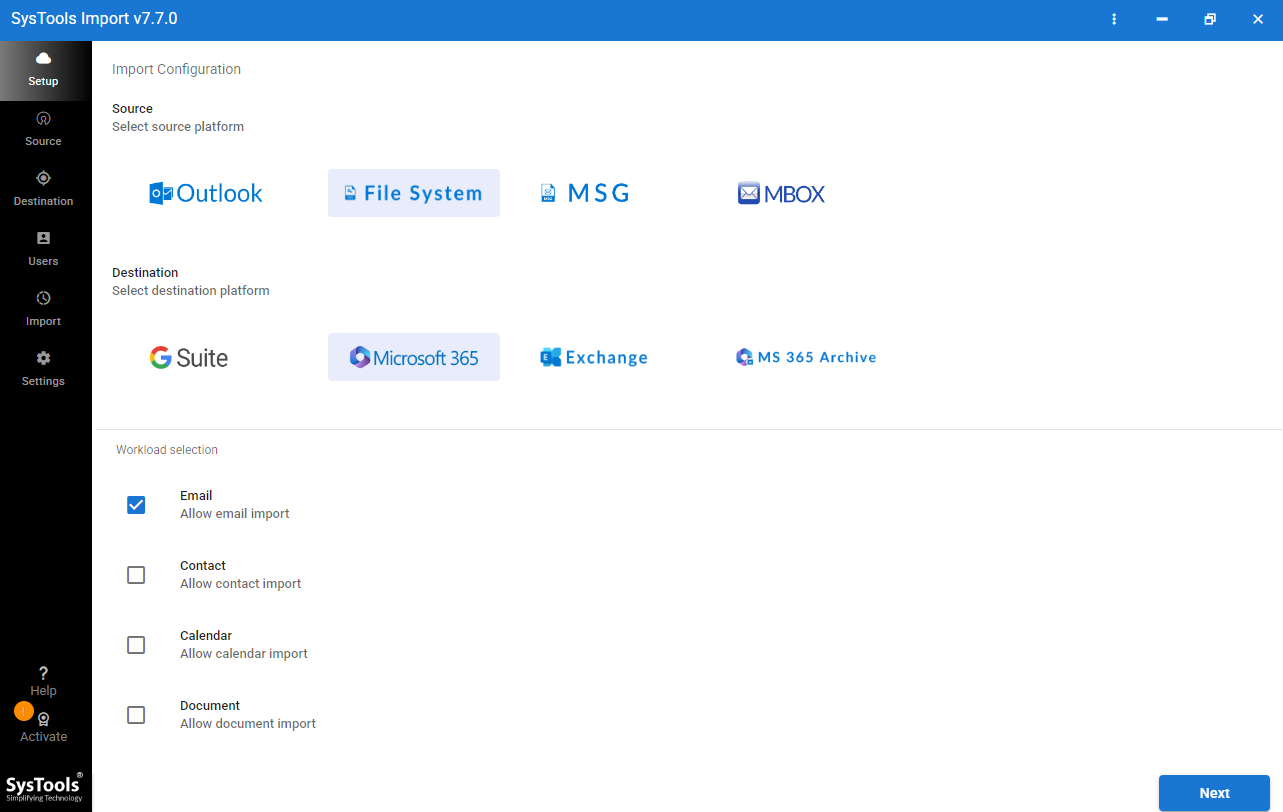
- Now, select File System as the source platform.
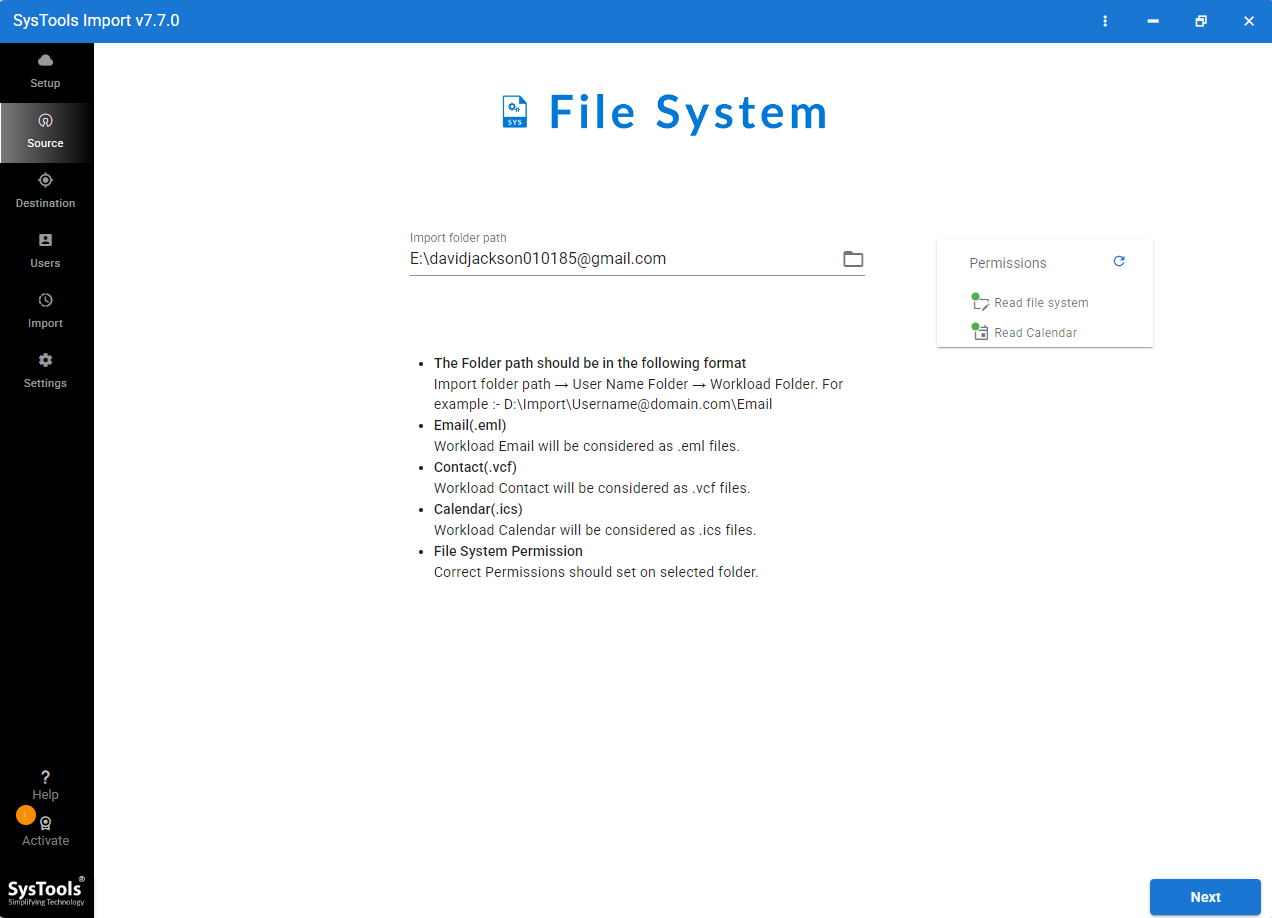
- Then, choose required EML files to import.
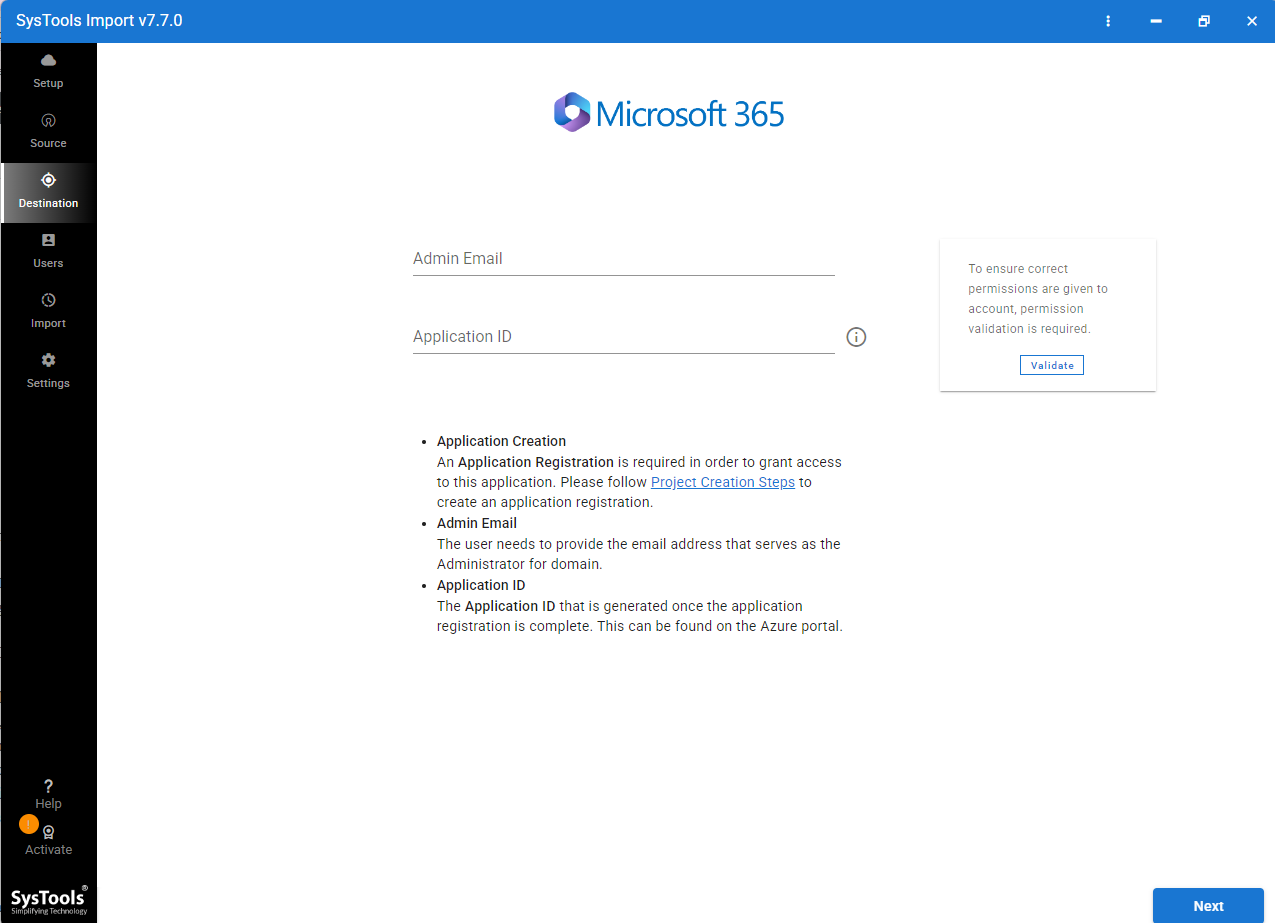
- Login with Microsoft Office 365 account.
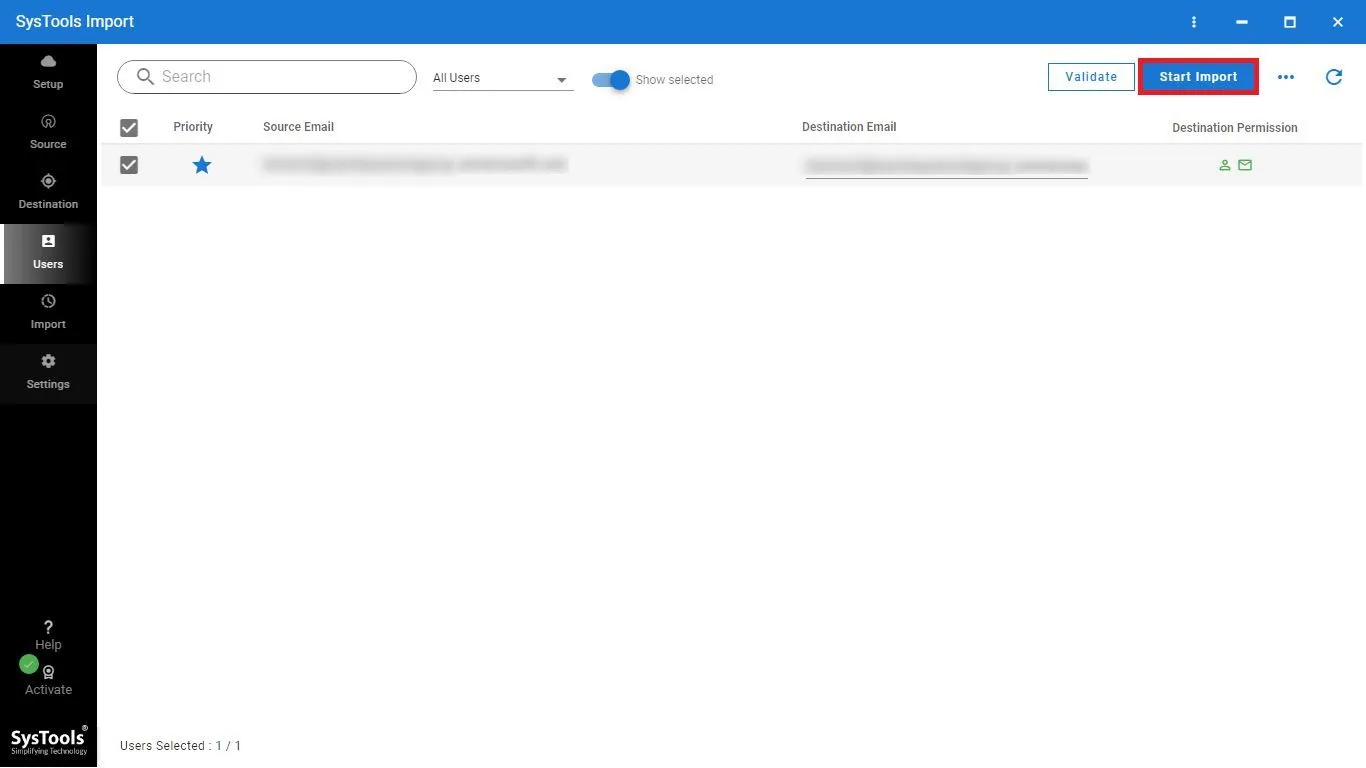
- At the end, click import to start the migration process.
Top Features of Expert Solution
Here are the top features of expert solution:
- This tool provides a report showing what was migrated, what skipped & any issues which occurred during the migration process.
- Software keeps your data exactly as it is. It maintains the original folder structure, read/ unread status, attachments & all email properties.
- Decide whether to import data into the user’s primary mailbox or directly into the archive mailbox to keep the mailbox organized.
- If internet connection is interrupted, the migration continues from where it stopped. It skips items that were already migrated, preventing duplicate data.
- It can transfer multiple mailboxes at the same time & manages Microsoft’s speed limit, helping complete large migrations more quickly.
Conclusion
Migrating from Zimbra to Microsoft Office 365 helps organizations improve security, collaboration & productivity. While the free IMAP method works for basic email migration. Professional tool offers a faster, more secure & reliable way to migrate Zimbra to Office 365 complete mailbox data with minimal effort.